
 RULE table Concepts
 RULE table Concepts
RULE TABLES
Umana has several rule tables: DATERULE, HOLRULE, SENRULE, TSTRULE.
Each table entry contains rules, with different rules applying to different employees.
Two (or more) filter columns control which rules apply to which employees. The table has ...
- A simple selection column by status/dept/etc., etc.
- A column for a selection expression (for more complex selection)
- There may be other filtering columns
For each employee, Umana uses only the first rule that matches the filter. The search stops there. Rules after that are ignored.
- That means the SORT order of entries in a table is critical.
Put exceptions before general rules.
In effect, a rule table is one large DO CASE (or IF / ELSEIF / ...).
- The filter part (selection) is the IF
- The other columns in the table – the rules to apply – specify the THEN.
The mechanism for applying rules varies depending on the table.
PROGRAMMING — How it works
A program that applies rules first calls the GETBEST function for the table, to determine which rule to apply to the employee being processed.
- GETBEST scans the xxxRULE table in order of the SORT and CODE values.
- As soon as GETBEST comes to a record where all criteria are met ...
- It stops searching
- And it returns that record to the calling program.
IMPLICATIONS FOR DEFINING YOUR TABLE
This means the table should be sorted with exceptions first.
For example, you might have 3 rules like
1. For employees with H_UNION='FIQ' and H_PSTAT='ETUD' do ...
2. For employees with H_UNION='FIQ' and H_PSTAT='TEMP' do ...
3. For other employees with H_UNION='FIQ' do ...
In effect, the 3rd rule applies to all FIQ employees except ETUD and PERM.
This is equivalent to programming code
DO CASE
CASE H_UNION='FIQ' and H_PSTAT='ETUD'
* applicable rules
CASE H_UNION='FIQ' and H_PSTAT='TEMP'
* other applicable rules
CASE H_UNION='FIQ'
* rules applicable to other PSTATs for FIQ
ENDCASEThe 3rd rule above is like an ELSE or OTHERWISE clause for FIQ employees. It is important to have a similar rule at the end covering all others.
(xxxRULE tables do not have an equivalent to nested IF statements.)
DEBUGGING
It is important to have testing tools to make sure that :
- Each employee has the correct rule
- No employee is left without an applicable rule. (No one falls through the cracks)
The tool for testing rules is the report
Print > Person > Applicable rule by employee.
- It will ask you "for which table".
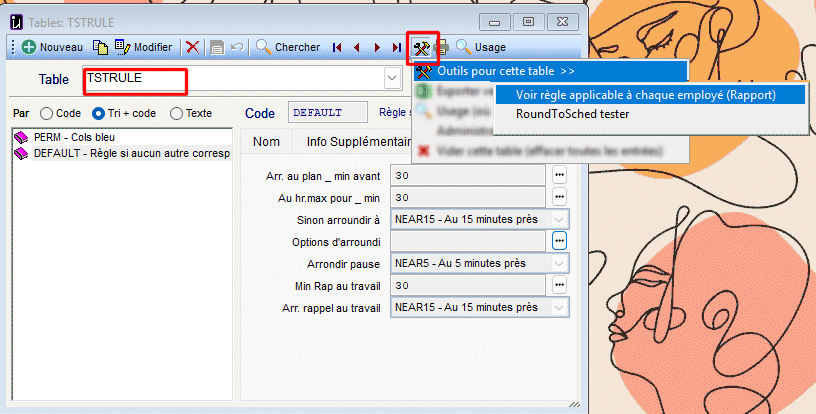
For the TSTRULE table, Umana offers another tool to test rounding rules for timesheets and time clocks
- It tests the RoundToSched program, which uses the TSTRULE table.
You can access these tools from the window Administration > Tables > xxxRULE >  . See image below.
© Carver Technologies, 2026 • Updated: 04/07/26